Solutions

The burst pipe reaches the on-call person. The loose tap waits for morning.

SayTrue answers after-hours calls, follows your emergency categories, captures address, trade and urgency, and transfers only the cases your rules mark for the on-call crew.

Emergency triage

Your categories decide what wakes the on-call person

Burst pipes, heating failure and electrical danger follow the protocol you approve. An unclear case takes the cautious route you configure.

Structured job intake

Address, problem and access notes arrive together

The agent collects the fields your dispatcher needs before creating a request, rather than leaving another incomplete voicemail.

Daytime call coverage

The crew stays on the roof while routine calls are answered

Service area, working hours, preparation and approved price language come from your knowledge base.

On-call hours

A transfer happens only when the rota says someone is available

Department and working-hour rules decide whether the caller is transferred now or receives an honest recorded next step.

The story

The night phone stopped treating every fault as the same emergency.

A regional plumbing and electrical contractor used one number for routine quotes, heating faults and genuine emergencies. At night the on-call technician either woke for an incomplete report or missed a message that did not include an address.

The company wrote its emergency categories and required intake fields into SayTrue. Routine work now waits as a complete request; a configured emergency follows the on-call route with the caller's exact wording. The technician receives the details needed to decide the next action without the agent diagnosing the fault.

During the day, the same flow answers service-area and preparation questions while the crew stays on site. The office begins with addresses and priorities already sorted, and every unclear case remains a visible request for a person rather than a confident technical guess.
How the contractor sets it up

  1. Define emergency categoriesWater, heating, gas, electricity and routine work each receive an approved protocol.
  2. Choose required intake fieldsAddress, trade, symptoms, access and contact are collected before a request is sent.
  3. Set the on-call rotaTransfers follow the real hours and contacts of the responsible department.
  4. Add routine service knowledgeCoverage area, preparation, hours and approved price wording handle common questions.
  5. Test one ambiguous reportConfirm that an unclear case follows your cautious path without inventing a diagnosis.

Emergency rules sit beside routine service facts and explicit intake requirements.

Question The agent answers Autonomy
A pipe has burst and water is spreading. Collects address, immediate risk and contact, states the approved safety step and follows the emergency route. hands to a human
The heating stopped but nobody is at risk. Applies the configured heating category and captures the property details for the appropriate route. opens a ticket
Do you cover my postcode? Reads the approved service-area entry. answers alone
Can you quote a full rewiring now? Explains the approved estimate process and captures the property and contact for review. opens a ticket
Is this electrical smell dangerous? Does not diagnose; gives only the approved safety wording and follows the urgent route. hands to a human
EXAMPLE KB Demo data (Code Alpha) · Illustrative scenario
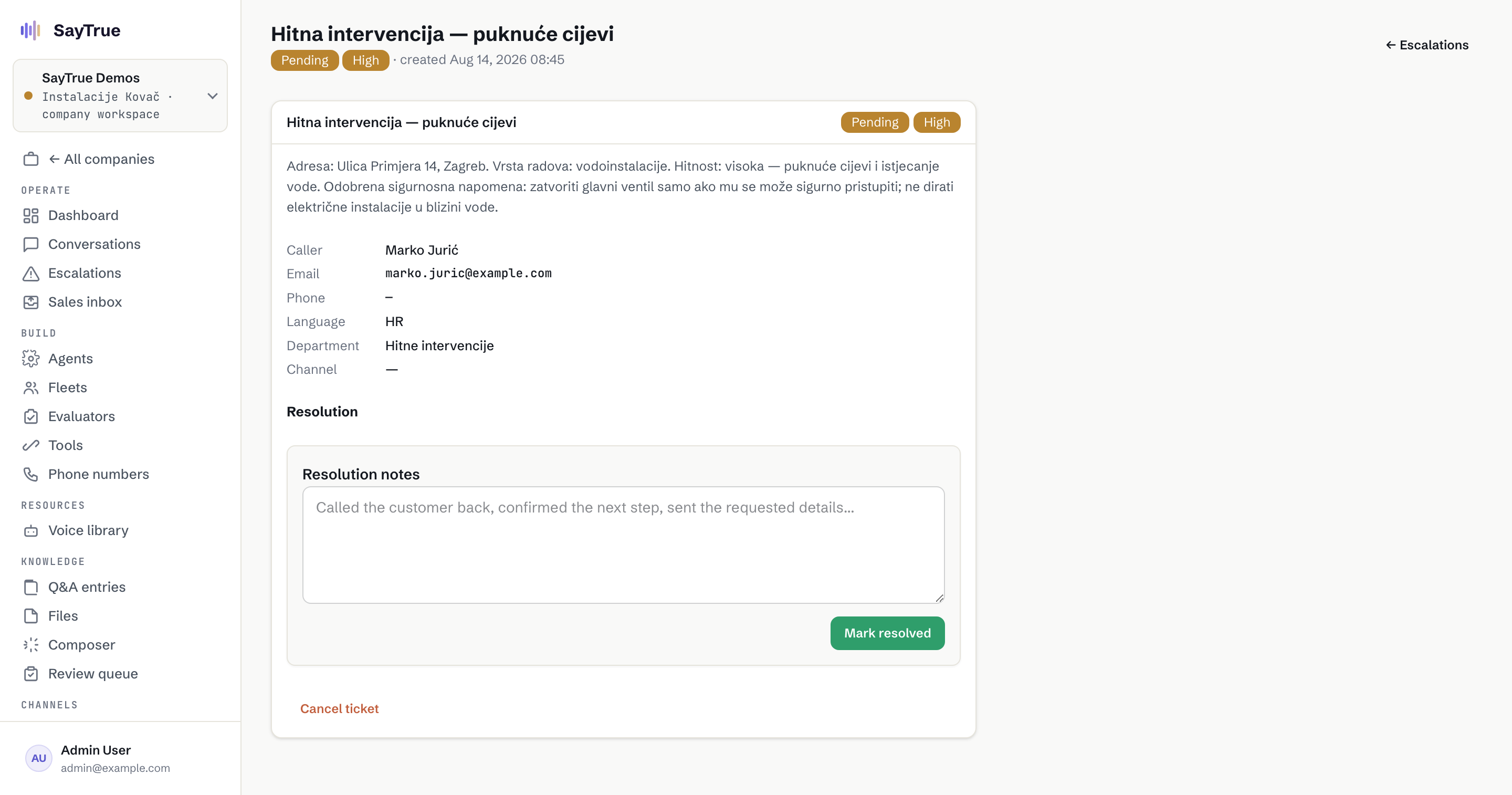
An Instalacije Kovač fault ticket in the SayTrue console showing Ulica Primjera 14, plumbing work, high priority, the approved safety note and the Hitne intervencije department
SCREEN 01 Address, plumbing fault, high priority and the approved safety note reach Emergency Interventions together. Demo data (SayTrue Demos) · Illustrative scenario
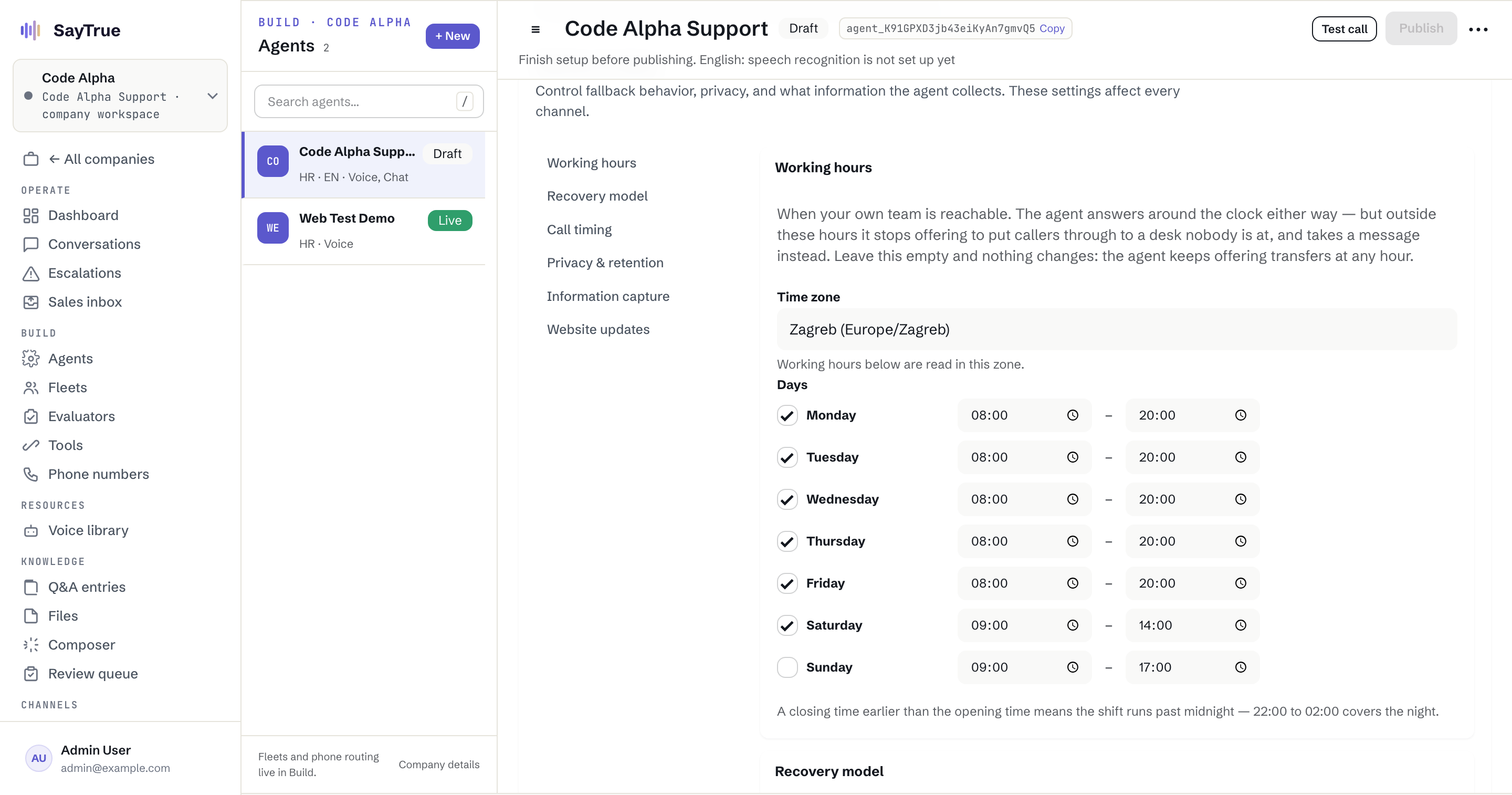
Working-hour controls for a trades on-call route
SCREEN 02 The real rota decides when a live transfer is available. Demo data (Code Alpha) · Illustrative scenario

See this on your own phone line and website.

Book a demo

What buyers in this trade ask us

How does the agent know what counts as an emergency?

You define the categories and the exact protocol for each one. The agent matches the caller's report to those rules, preserves the caller's wording and uses the cautious route you selected when the situation is not clear.

Can it diagnose a fault or promise a repair time?

No. It collects symptoms and context, states only the approved safety guidance and never diagnoses equipment or promises an arrival time that your team has not confirmed.

What information reaches the dispatcher?

Address, trade, description, urgency category, access notes, caller contact and timestamp, together with the conversation context. Your own form decides which fields are required.

What happens when the on-call person does not answer?

The failed transfer remains visible and the configured fallback applies: another approved contact or a structured request. The caller hears the next step you actually support, not a fabricated promise.

More depth in our guides →

Answers your customers can trust.

Grounded in your knowledge, honest about its limits, and handed to your team the moment it should be.