Solutions

The caller remembers the deadline. Your clerk receives the whole request.

SayTrue answers approved administrative questions, captures the client reference, matter and documents involved, then routes the request to the responsible person without generating tax advice.

Administrative answers

Deadlines and document lists from approved firm guidance

Opening hours, upload routes, standard checklists and published deadlines are answered from entries your firm controls.

Client identification

The client reference is collected before the handoff

Name, client number, matter, deadline and callback details travel together to the responsible clerk.

Matter routing

Payroll, VAT and annual accounts reach different queues

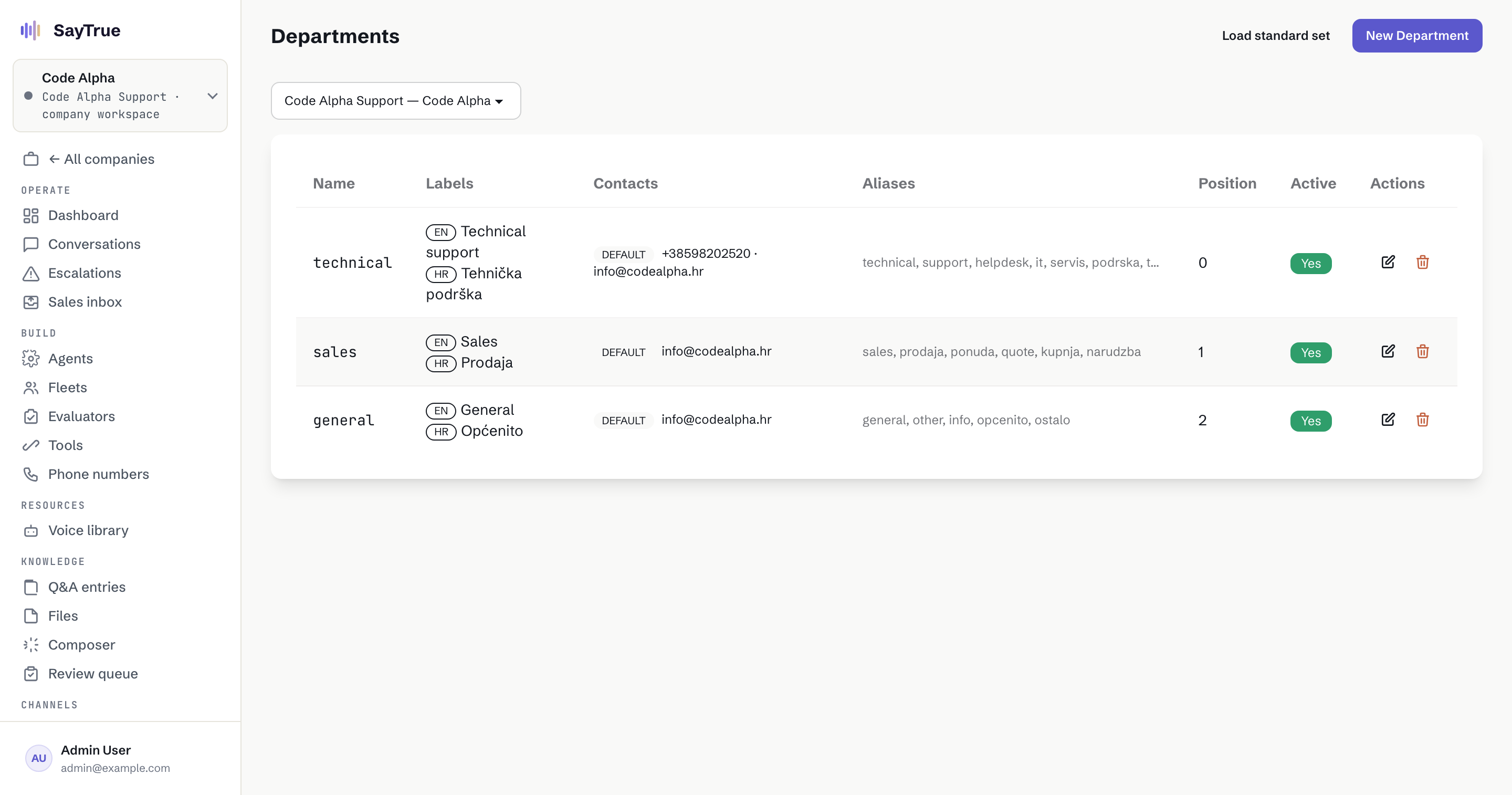
Departments, aliases and working hours route each request according to the structure of your firm.

Professional boundary

Administrative help does not become improvised tax advice

Case-specific interpretation and decisions go to a qualified person with the conversation context attached.

The story

A deadline question arrived with the client reference already attached.

A tax advisory firm received calls about missing documents, filing dates and case status while clerks were preparing returns. Messages often omitted the client number or the actual deadline, creating another round of callbacks before anyone could act.

The firm approved its administrative answers and defined separate intake routes for payroll, VAT and annual accounts. SayTrue now answers the routine questions and captures the client reference, matter, deadline and contact. Questions that require professional judgment go to the responsible person without the agent producing tax advice.

The responsible clerk receives enough context to act without first reconstructing the call. The firm still owns every interpretation and deadline decision, while the agent consistently explains only approved document and process information. Missing answers become review items for the firm, not improvised guidance.
How the firm sets it up

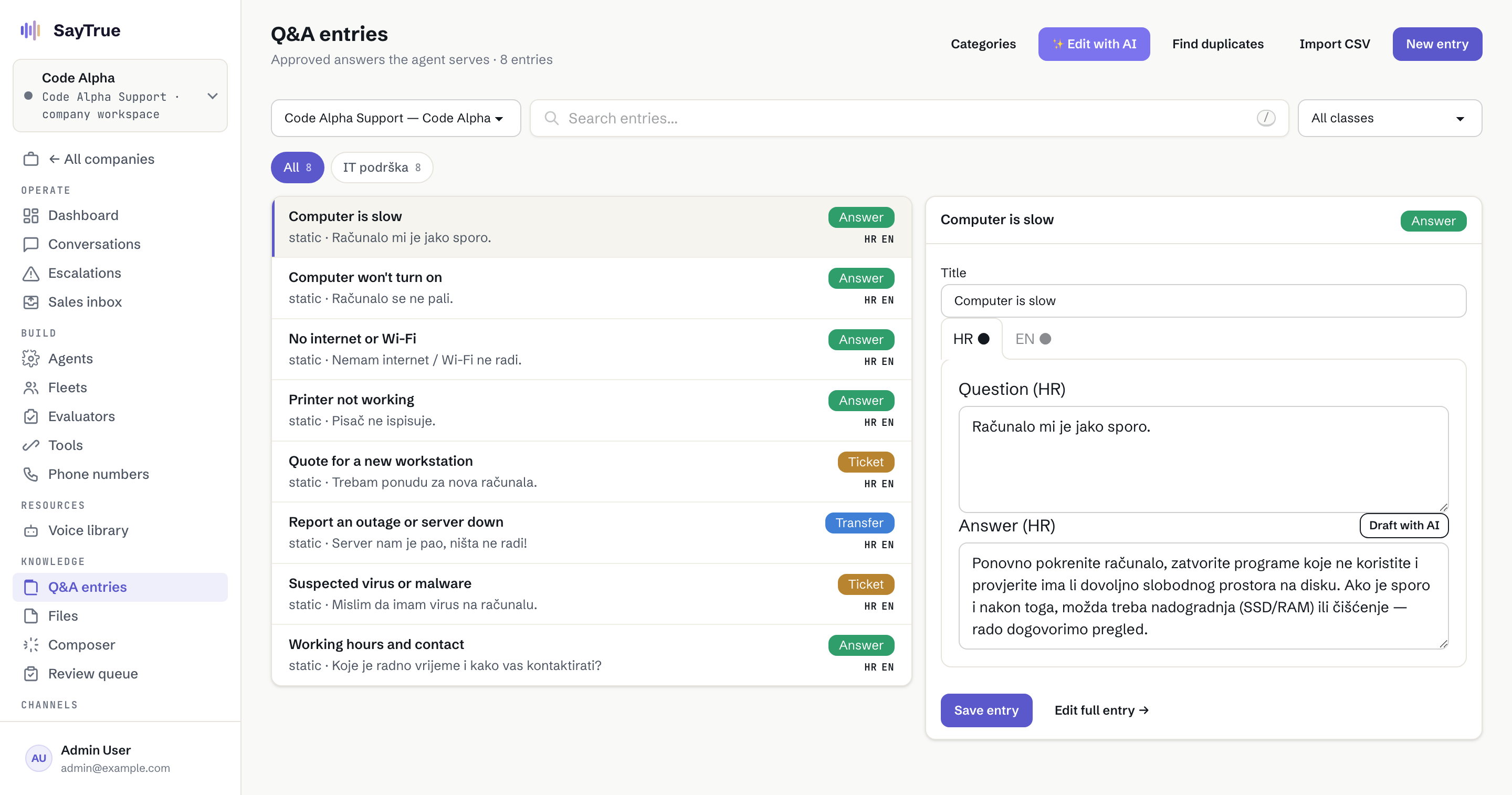
  1. Approve administrative knowledgeOpening hours, document routes, standard lists and public deadlines become controlled entries.
  2. Define matter categoriesPayroll, VAT, annual accounts and general administration each have their own required fields.
  3. Require the client referenceThe request cannot be sent until the identifiers your clerks need are present.
  4. Map teams and working hoursEach matter follows the correct clerk or queue without ringing an empty office.
  5. Test an advice requestConfirm that a case-specific tax question reaches a qualified person instead of receiving generated advice.

Administrative facts answer directly; client-specific interpretation has a human route.

Question The agent answers Autonomy
Where should I upload the payroll documents? Reads the approved upload route and file checklist. answers alone
Which documents are missing for my annual accounts? Captures the client reference and request for the responsible clerk. opens a ticket
When is your office open? Reads the firm's approved working-hours entry. answers alone
Should I claim this expense? Does not interpret the case and routes the question to a qualified person. hands to a human
Has my return been filed? Uses an approved read-only status lookup or records the request with the client reference. opens a ticket
EXAMPLE KB Demo data (Code Alpha) · Illustrative scenario
Departments with separate routing contacts in the SayTrue console
SCREEN 01 Each matter follows the queue and working hours defined by the firm. Demo data (Code Alpha) · Illustrative scenario
Approved Q&A entries and autonomy classes in the SayTrue knowledge base
SCREEN 02 Administrative answers remain separate from questions requiring professional judgment. Demo data (Code Alpha) · Illustrative scenario

See this on your own phone line and website.

Book a demo

What buyers in this trade ask us

Can the agent give tax or legal advice?

No. It answers only approved administrative information and does not interpret a client's facts or recommend a tax position. Case-specific questions are captured and routed to a qualified member of the firm.

Will it ask for the client number?

Yes, when your intake definition requires it. Client reference, matter, deadline, documents and callback contact can be required before the request reaches the correct queue.

How is confidential information handled?

Retention is configured per client and enforced by a nightly purge, records are tenant-scoped, and provider credentials are encrypted. The firm should configure the minimum fields needed and avoid collecting sensitive detail that is not required for routing.

Can it read a live case status?

Only when the firm exposes an explicitly approved read-only connection and the lookup can be safely scoped. Otherwise the agent records the status request for the responsible clerk instead of inventing an update.

More depth in our guides →

Answers your customers can trust.

Grounded in your knowledge, honest about its limits, and handed to your team the moment it should be.